
ClassDojo
ClassDojoEducation
4.883.39K Reviews
- Version
- 9.12.0
- Installs
- 50.00M
- Age Rating
- Everyone
Screenshots
Our Review of ClassDojo
 Analysis by Appyee
When a school day moves quickly, small details are often the first things families miss: a reminder, a classroom moment, or a note about how a child is settling in. I see ClassDojo as an attempt to keep those everyday classroom connections in one place rather than scattering them across paper notes and separate messages. It is an education app from ClassDojo, and its central idea is straightforward: give teachers, children, and families a shared way to stay connected.
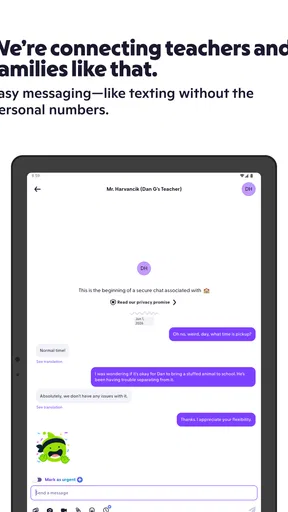
That setup is most useful when a teacher and family both want an ongoing view of school life, not just a channel for urgent announcements. It can make the distance between the classroom and home feel smaller, but it works best when everyone understands what they are expected to check and when. I would approach it as a communication routine, not a replacement for a proper conversation when a concern needs more than a quick update.
Starting with the classroom routine
The practical starting point is deciding what the classroom needs the app to do. A teacher might want families to see selected classroom moments and receive feedback about positive behavior; a parent might mainly want a dependable place to notice updates. Those are related goals, but they are not identical. Before relying on the app, I would agree on what kinds of information belong there and what should still be handled in person or through the school’s usual process.
That small agreement can prevent a common source of friction: one person treats an app notification as a casual extra, while another expects it to be the main line of communication. For families, it helps to decide who will check updates and how often. For teachers, a consistent posting habit is more useful than bursts of activity followed by silence. The app can bring people together, but the routine around it is what makes it dependable.
Following a school day from update to response
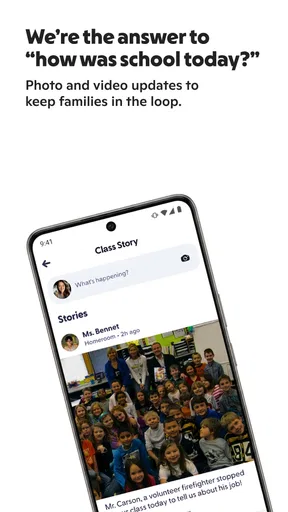
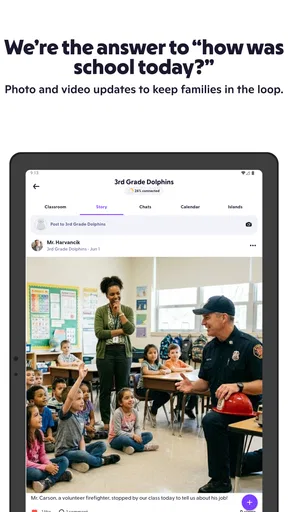
If a teacher shares a classroom photo or video, a parent can get a glimpse of the day without waiting for a scheduled meeting. That is a pleasant way to make school feel less remote, especially for families who cannot see what happens between drop-off and pick-up. I would still treat a shared moment as a small window rather than a complete account of the day: a picture can show an activity, but it cannot explain every child’s experience or replace a teacher’s context.
A useful everyday workflow might be simple: a teacher posts a classroom moment, a family checks it after school, and the child gets a chance to talk about what they were doing. The update then becomes a prompt for conversation at home, rather than something a parent merely scrolls past. This is a more meaningful use of classroom sharing than expecting every post to function as a full progress report.
Feedback that can travel from school to home
The virtual dojo points add a visible recognition element. In a classroom that uses them thoughtfully, a child can receive positive feedback for behavior, and a family can use that as a starting point to ask what went well. I like the potential for specific encouragement, especially with younger students who respond to recognition. The important detail is that points work best when they support an understandable goal, not when they become the entire definition of success.
For example, if a child comes home pleased about earning recognition, a parent can ask what action led to it and praise the effort or choice behind it. That keeps the feedback connected to real behavior. If points are presented without explanation, families may see a score without knowing what it means, and children may focus on collecting recognition instead of understanding the classroom expectation. The teacher’s explanation and the family’s follow-through matter as much as the reward mechanic.
A Digital Classroom Companion
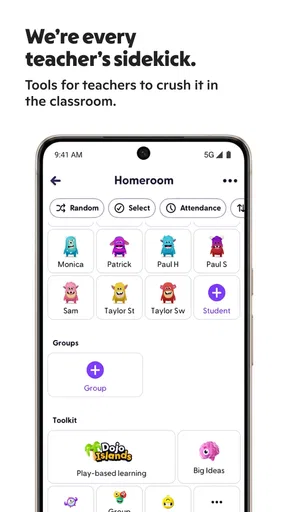
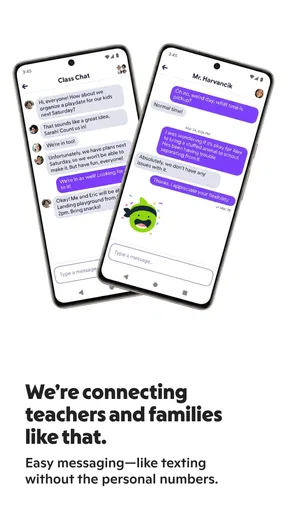
First things first, let me give you a quick rundown of what ClassDojo is all about. It's essentially a communication platform that brings teachers, parents, and students together under one digital roof. Think of it as a virtual classroom where everyone can interact seamlessly. As soon as I launched the app, I was greeted with a clean, user-friendly interface that made navigation a breeze.
Features That Stand Out
One of my favorite features in ClassDojo is the ability for teachers to share moments from the classroom in real-time. This means parents can get a peek into their child’s school day through photos, videos, and even live updates. It’s almost like being a fly on the wall in the classroom—and trust me, it’s addictively engaging!
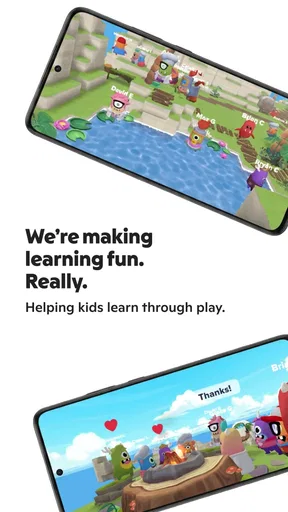
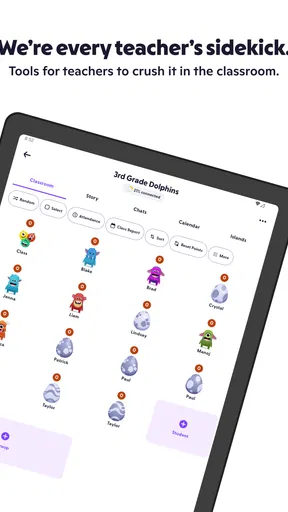
Aside from that, the app also allows for personalized feedback. Teachers can give students virtual 'dojo points' for positive behavior, encouraging a supportive and motivating learning environment. This gamified approach to education is something I believe really hits the mark, especially for younger students who thrive on recognition and rewards.
Personal Experience and Thoughts
Using ClassDojo felt like a breath of fresh air. As someone who remembers the old days of clunky communication systems, this app felt like a dream come true. The ease with which you can connect with teachers and get updates about your child’s progress is genuinely impressive. Plus, the social media-like interface makes it fun and engaging for kids.
However, it’s not just about the fun stuff. ClassDojo also makes it simple for teachers to organize their classroom activities, manage schedules, and communicate with parents without any hassle. It’s like having a digital assistant tailored specifically for educational needs.
A Few Final Thoughts
In conclusion, if you're a teacher, parent, or student, ClassDojo is an app worth checking out. It brings everyone together in a way that’s not only efficient but also enjoyable. The app is available for both Android and iOS, and setting it up is as easy as pie. So, whether you’re looking to enhance communication or simply want to keep up with the latest in educational tech, this app has got you covered. Give it a try; you won’t regret it!
Where the handoffs need care
The most revealing part of this kind of workflow is what happens between people. A teacher can share a classroom moment, but the family decides whether to turn it into a conversation; a child can receive feedback, but the adults still need to explain what that feedback means. I would not assume that a notification has been understood just because it has appeared on someone’s screen. A quick check-in at home or a brief clarification from the teacher can close that gap.
For a family with more than one caregiver, it is also worth agreeing who will keep an eye on school updates. If everyone assumes someone else has seen a message, a useful reminder can be missed. On the other hand, if several people react to every small post, the app can create more chatter than the classroom needs. A simple division of responsibility makes the handoff calmer: one person follows routine updates, then shares anything the family should discuss together.
Teachers face a similar balancing act. A stream of frequent posts may feel engaging to some families but become background noise to others. A concise, purposeful update is easier to notice and respond to than a constant flow of low-priority items. I would use classroom posts to show meaningful moments or reinforce a useful point, while saving sensitive or complicated conversations for a direct discussion through the school’s appropriate channels.
How it fits beside familiar school communication
Compared with paper notices, ClassDojo can make classroom updates easier to revisit and can give families a more immediate glimpse of school activities. Compared with ordinary email or a general messaging app, its appeal is that the connection is centered on the classroom rather than mixed into personal conversations. That focus can be helpful, but it also means it is not automatically the best tool for every school communication need.
If a school already has a well-established parent portal for formal records, schedules, or administrative tasks, I would keep using that for the things it handles well. ClassDojo makes more sense as a day-to-day bridge between classroom and home than as a universal substitute for every school system. Likewise, a family that only needs occasional formal notices may prefer a quieter channel instead of adding another app to check.
One practical tip is to treat posts as prompts, not as a complete archive of a child’s learning. A classroom photo can help a parent ask a better question—“What did you build today?”—but it should not be mistaken for a full account of academic progress. This distinction helps families get value from the engaging parts without expecting a social-style feed to answer questions it was not designed to settle.
Who is likely to get the most from it
I think the app suits teachers who want to make classroom life more visible and families who appreciate regular, approachable contact. It may be especially helpful for a parent who wants small conversation starters after school, or for a young student who responds well when positive behavior is recognized in a clear, encouraging way. A classroom that agrees on a steady, manageable posting rhythm is more likely to find it useful than one that treats it as an occasional experiment.
It is less compelling for someone who dislikes checking another communication channel, or for families whose school does not use it consistently. If a teacher rarely shares updates, the family may not get enough value to justify building a new habit around it. It is also not the right choice for a detailed, private discussion that needs nuance; in that situation, I would contact the teacher directly through the school’s preferred method rather than trying to resolve it through a short update.
The app is free to download, is rated for Everyone, and offers in-app purchases ranging from about a dollar to around two hundred dollars per item. It has a 4.8 average from around 1.2 million ratings and has been installed over 10 million times. Those figures suggest that it is widely used, but they do not tell me whether a particular school will use it regularly. I would check how the child’s classroom plans to use it before making it part of the family’s daily routine.
Small habits that make the experience clearer
For parents, I would start by checking updates at a predictable time rather than reacting to every alert as it arrives. That keeps school communication from interrupting the whole day while still making it easy to bring a classroom moment into the evening conversation. If a post is unclear, asking the child what happened before drawing conclusions is a useful safeguard: a brief image or note rarely contains the full context.
For teachers, the most useful posts are the ones that give families a reason to engage without creating an expectation of constant access. Sharing a few meaningful moments can help children retell their day, while targeted feedback can make encouragement more concrete. The trade-off is time and attention: classroom communication takes effort, and a tool that is meant to simplify contact can become another task if the posting routine is too ambitious.
Children may enjoy the familiar, social-style feel, but I would keep adult guidance in the picture. A student should understand that points are one form of classroom feedback, not a measure of personal worth or a promise of a reward at home. This is a small distinction, yet it can prevent a motivating feature from turning into pressure or disappointment when recognition varies from day to day.
What to expect before making it a habit
ClassDojo was released in 2013, and version 8.8.0 is the current version. It is available on Android and iOS, with Android support starting at version 8.0. That makes it worth checking the device requirements before setting it up on an older Android phone. The app is free, though optional in-app purchases are available, so families should not confuse the free entry point with a promise that every item or service connected to the app is included at no cost.
My main question before joining would be practical: will the teacher and family both use it in a way that suits the child? If the answer is yes, it can make small school-home handoffs smoother and give everyday updates a useful place to land. If the school relies on another system, or the family prefers fewer notifications and more direct conversations, sticking with that established approach may be better.
A grounded choice for school and home
What I like most is the chance to turn a classroom update into a real exchange between a child and the adults who care for them. What I would watch closely is the tendency to confuse visibility with understanding: seeing a post is not the same as knowing how the day went, and earning points is not the same as learning why a behavior matters. Used with those limits in mind, the app can be a friendly companion to school life rather than a substitute for it.
If your classroom already uses it and you want a more connected view of the school day, I think it is worth trying. If you need a formal record system, a private channel for complex concerns, or simply do not want another app in your routine, a school portal, direct contact, or paper communication may fit better. For me, the deciding factor is not the feed itself but whether it helps the adults and child have clearer, more useful conversations.
Privacy and Permissions
See what permissions an app requests and how it handles your data.
- Photos/Media/Files
- read the contents of your USB storage, modify or delete the contents of your USB storage
- Storage
- read the contents of your USB storage, modify or delete the contents of your USB storage
- Camera
- take pictures and videos
- Microphone
- record audio
- Wi-Fi connection information
- view Wi-Fi connections
- Other
- view network connections, full network access, change your audio settings, control Near Field Communication, run at startup, control vibration, prevent device from sleeping
Verdict
Strengths of ClassDojo
- User-friendly interface for easy navigation.
- Real-time updates enhance parent-teacher communication.
- Engaging tools for student motivation.
- Customizable features for tailored experiences.
- Supports multiple languages for inclusivity.
Limitations of ClassDojo
- Limited offline functionality for certain features.
- Requires stable internet for optimal performance.
- Some premium features behind a paywall.
- Notifications can become overwhelming.
- Privacy concerns with data sharing.
Other Releases by ClassDojo
View All
Dojo Islands
Educational3.8
Similar Picks in This Category
View All
Duolingo: Language Lessons
Duolingo4.7

Google Classroom
Google LLC2.8

Unacademy: Learn & Crack Exams
Unacademy3.2

Bible App for Kids
Life.Church4.4

Cake - Learn English & Korean
Cake Corp.4.7

Brainly: AI Homework Helper
Brainly4.5
Frequently Asked Questions
What is ClassDojo and how does it work?
ClassDojo is an educational app designed to facilitate communication between teachers, students, and parents. It provides a platform where teachers can share updates, track student behavior, and post class stories. Students can also engage by sharing their work and receiving feedback, while parents stay informed about their child's progress and classroom activities.
Is ClassDojo free to use?
Yes, ClassDojo is free for teachers, students, and parents. The basic features, such as communication tools and class management options, are available at no cost. However, there are premium features under ClassDojo Plus, which offer additional tools and customizations for a subscription fee.
What devices support ClassDojo?
ClassDojo is available on a wide range of devices, including smartphones, tablets, and computers. It supports both Android and iOS platforms, making it accessible through the Google Play Store and Apple App Store. Additionally, ClassDojo can be accessed via any web browser, ensuring flexibility in how users choose to engage with the app.
How does ClassDojo ensure student privacy and security?
ClassDojo is committed to maintaining high standards of privacy and security. The app complies with COPPA, FERPA, and GDPR, ensuring that student data is protected. ClassDojo does not share personal information with third parties without consent and uses encryption to safeguard data. Parents and teachers can be assured of its secure environment.
Can ClassDojo be used for remote learning?
Yes, ClassDojo is well-suited for remote learning environments. It allows teachers to post assignments, conduct virtual classroom activities, and communicate with students and parents in real-time. The app's features support the continuity of learning outside the traditional classroom setting, making it a versatile tool for both in-person and remote education.
